Settings Search V1.1.0.0

FS25 Other

Settings Search V1.1.0.0


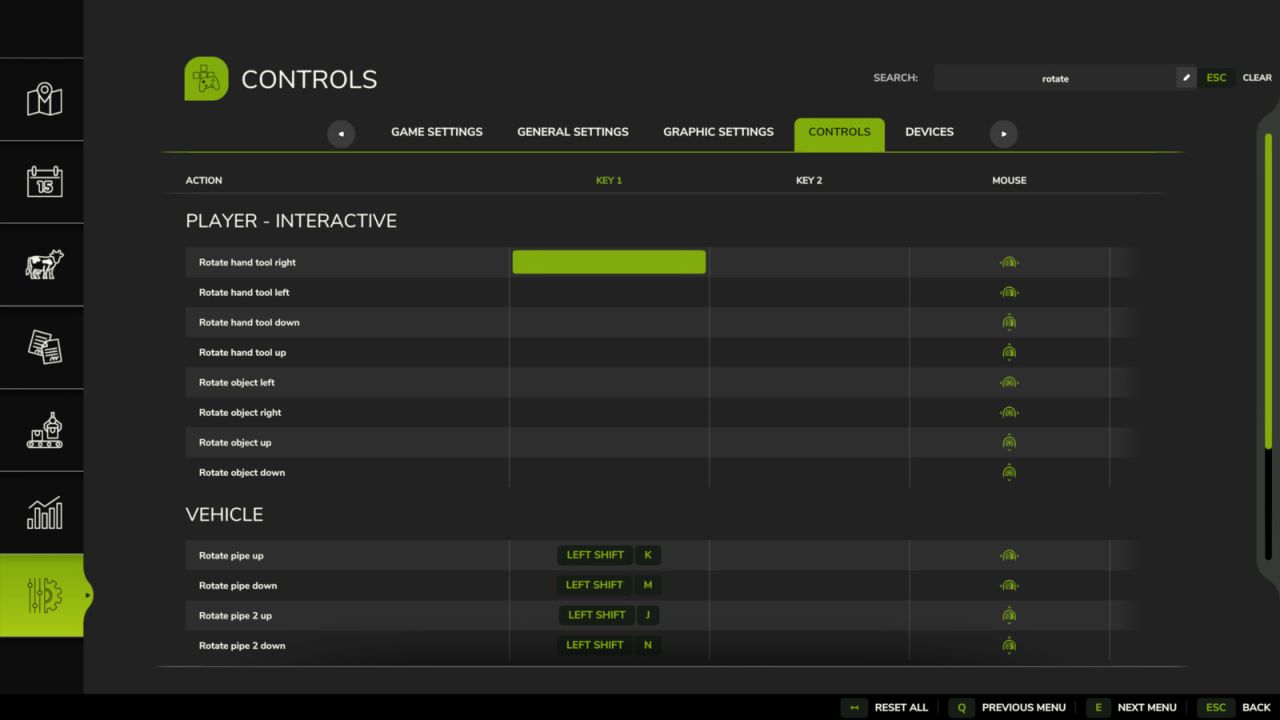
Search across every tab in the settings menu: Game, Graphics, Audio, Controls, Additional, Accessibility, and whatever other mods add. Jump to a tab and type, or search first and see which tab the result is hiding in. Searching for a section name like “Camera” shows the whole section. In the Controls tab this also works for mod names, for example “AutoDrive” or simply “AD” and “CP”, to see all of their key bindings at once.

V1.1.0.0
Controls tab: search for abbreviations such as AD for AutoDrive or CP for Courseplay
Searching for a section name such as “Camera” now displays the entire section in every tab
Fixed: the controls list could get stuck when there were very few results

Author:
Nalathan


What is FS25 mod use for:

Have you ever tried using Farming Simulator 25 mods? If not, it’s high time you do. This is the perfect place to find everything that you need to know! Farming Simulator 25 Mods will have a huge impact on your initial game. We are not saying that the original game is not good enough, but there is always room for improvement and extra challenge. We believe that you might want some more tools, more extensive choice of vehicles and other elements in your game. Also, the game itself provides you with different mods in order to solve disturbing bugs. Overall, FS25 / FS22 mods help to lift the experience of the game, which makes it more interesting. LS 25 / 22 mods will enable you to create your own specific and unique experience and since there are many different FS25 / FS22 mods, you can slowly introduce them into your game and make it completely your own. On the plus side, the LS 25 / 22 mods are all completely free, so don’t be afraid to try them out because you will not be charged any hidden fees. So, now you should definitely be convinced to download Farming Simulator 25 / 22 mods and begin customize your game!


You may also like...

Leave a Reply

Your email address will not be published. Required fields are marked *